
SEO
What Is Link Building? 7 White-Hat Ways to Earn Links
A plain guide to link building: what it is, why it matters, what makes a link good, and seven white-hat ways to earn links that last.

 By Taylor Orlando
·November 25, 2026
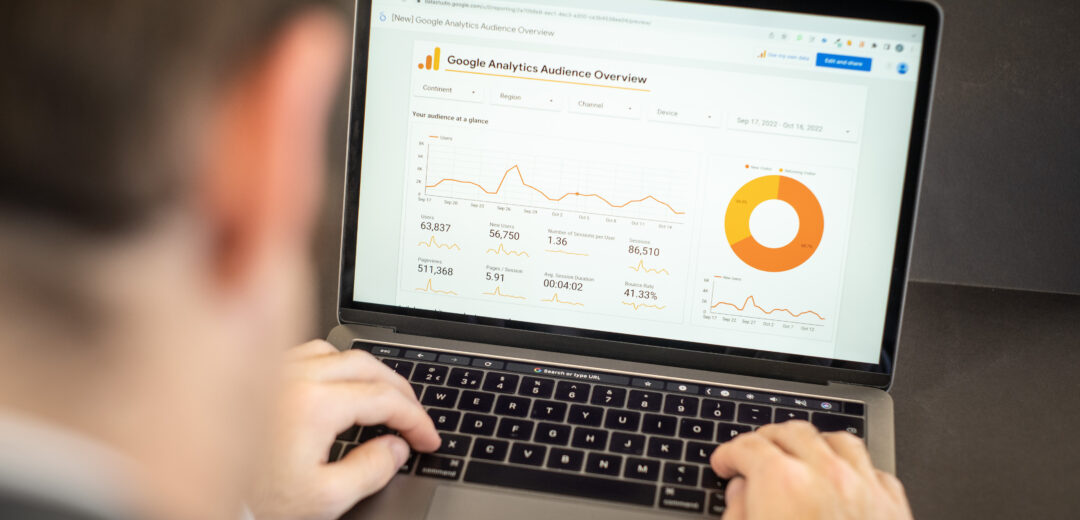
Learning how to improve website SEO is one of the best things you can do for a small business website. When your pages rank higher on Google, more people find you without you paying for ads. You do not need to hire an agency or learn to code. Most of the work is simple: fix the basics, write pages that answer real questions, and keep track of what works. This guide walks you through 12 steps in the order that matters most, with free tools and a realistic timeline.
In this guide:
SEO stands for search engine optimization. It is the work of making your website easy for Google to understand and easy for people to use. Google’s job is to show the best page for each search. Your job is to make your page the best answer — clear, fast, trustworthy, and easy to read.
Good SEO has three parts. Technical SEO makes sure Google can reach and read your pages. On-page SEO is about the words, titles, and headings on each page. Off-page SEO is about other websites linking to you, which tells Google your site is worth trusting. You need all three, but you should fix them in order: technical first, then on-page, then links. Many small sites skip the first two and wonder why nothing works.
One more thing to know before you start: SEO is slow. A change you make today may take weeks to show up in search results. That is normal. The steps below are still worth doing, because they build up over time.
Before you change any words on your site, check that Google can see your pages at all. If a page is not indexed, it cannot rank, no matter how good it is.
Set up Google Search Console. It is free, and it is the tool Google itself gives you to see how your site appears in search. Add your site, prove you own it, and submit your sitemap. A sitemap is a simple file that lists your pages so Google can find them. Most website builders and WordPress SEO plugins create one for you — it usually lives at yoursite.com/sitemap.xml.
Once Search Console is running, check the Pages report. It shows which pages Google has indexed and which ones have problems. Fix the errors first: pages blocked by mistake, pages Google cannot reach, and pages marked as duplicates. Also use the URL Inspection tool to check your most important pages one by one. If a page says “URL is not on Google,” ask Google to index it.
While you are here, check that your site uses HTTPS (the lock icon in the browser bar). Google treats HTTPS as a basic trust signal, and visitors do too. If your site still starts with http://, ask your host to turn on the free SSL certificate that comes with most hosting plans.
Every page on your site should target one main keyword — the phrase someone would type into Google to find that page. Without a target keyword, you are guessing. With one, every other step in this guide has a clear goal.
Start with the words your customers actually use, not the words your industry uses. A plumber’s customers search “emergency plumber near me,” not “residential plumbing solutions.” A bakery’s customers search “birthday cake delivery,” not “artisanal confectionery services.” Write down how a real customer would ask for what you sell, then check it in a free tool.
Google’s own Keyword Planner (free inside a Google Ads account, no ad spend needed) shows how often a phrase is searched. Google Autocomplete is even simpler: start typing a phrase into Google and see what it suggests. Those suggestions are real searches from real people.
Pick keywords you can actually win. A small site will not rank for “best shoes” — big brands own that search. But it can rank for “best running shoes for flat feet under $100” or “affordable wedding photographer in Austin.” Longer, more specific phrases have less traffic, but the people who search them are much closer to buying. Give each page one main keyword and two or three closely related ones, and do not target the same keyword on two different pages — Google will not know which one to rank.
The title tag and meta description are the two lines people see about your page in the search results. They do not decide your ranking on their own, but they decide whether anyone clicks. A page that ranks fifth with a clear title often gets more clicks than a page that ranks third with a dull one.
Write a different title for every page. Put your main keyword near the start, say what the page offers, and keep it under 60 characters so it does not get cut off. Compare these two:
Then write a meta description for each page: one or two plain sentences, about 150 characters, that tell the searcher what they will find and why it helps them. This text does not show on your page, only in the search results, so write it for the person scanning the results, not for Google.
Most website builders and WordPress SEO plugins let you edit the title and description for each page. Go through your most important pages first — home page, main service pages, and your best blog posts — and fix them one by one.
Google tries to guess what the searcher wants. Your page has to match that guess. This is called search intent, and it is one of the most common reasons good pages do not rank.
Before you write or rewrite a page, search for its keyword on Google and look at what already ranks. If the top results are blog articles, Google thinks people want to learn — so write a guide, not a sales page. If the top results are product pages, people want to buy — so write a product page, not a guide. If the top results are local business listings, people want a nearby business — so make sure your location is clear on the page.
A simple test: if your page looks nothing like the top 10 results for its keyword, it probably will not rank for that keyword, no matter how well written it is. Either change the page to match the intent, or pick a different keyword that fits what the page actually is.
Content is still the heart of SEO, but “more content” is not the answer — better answers are. A page ranks when it gives the searcher everything they need, in plain language, without making them dig for it.
Answer the main question in the first paragraph. If someone searches “how much does it cost to fix a leaking roof,” they want a price range in the first few lines, not three paragraphs about your company’s history. Put the answer first, then the detail below it for people who want to read on.
Cover the follow-up questions too. Look at the “People also ask” box on Google for your keyword — those are the exact questions searchers ask next. If you answer three or four of them on your page, your page becomes the one-stop answer, and Google notices.
Write for people first. Use short sentences and short paragraphs. Say “you can fix this in 20 minutes” instead of “this task can be completed within a short time frame.” Use your keyword a few times where it fits naturally — in the first paragraph, in one or two headings, and once or twice in the body — but never force it. Repeating a keyword ten times in a short page does not help; it makes the page hard to read, and Google can tell.
Finally, fix your old pages before you write new ones. Most small sites already have pages that rank on page two or three of Google. Updating one of those — better title, fuller answer, a few new facts — often brings faster results than publishing a brand-new page.
Headings (H1, H2, H3) tell Google and readers how your page is organized. One page should have one main title, then sections under it, then smaller points inside each section — like chapters and sub-chapters in a book.
Keep it simple: the page title is your H1 and should include your main keyword. Each big section gets an H2 that says what the section is about. Smaller points inside a section get an H3. Do not skip levels, and do not use a heading just to make text big and bold — that is what bold text is for.
Good headings also help real people. Most visitors scan a page before they read it. Clear headings let them find the part they need in seconds, and a visitor who finds what they need stays longer — which is exactly what Google wants to see.
Slow pages lose visitors and lose rankings. Google measures page speed as part of its ranking system, and people leave a page that takes too long to load. You do not need a perfect score — you need a site that feels fast.
Test your pages with PageSpeed Insights, Google’s free speed tool. It gives your page a score and, more usefully, a list of the exact things slowing it down. Run your home page and your two or three most important pages through it.
The fixes that help most small sites are usually the same:
As a rough target, aim for your main content to appear in under 2.5 seconds. That is Google’s threshold for a good Largest Contentful Paint score, one of its Core Web Vitals measures. Do not chase a perfect 100 — a fast, working site beats a slow site with a perfect score.
Most people now find websites on their phones, and Google ranks your site mainly by how its mobile version looks and works. If your site is hard to use on a phone, it will rank worse — even for people searching on a computer.
Open your site on your own phone and try to use it like a customer would. Can you read the text without zooming? Are the buttons big enough to tap? Does the menu work? Does anything overlap or run off the screen? These are the problems that hurt you most.
Use a responsive design, which means your layout adjusts itself to the screen size instead of showing a shrunken desktop page. Every modern website builder and WordPress theme does this by default, but old themes and custom designs sometimes do not. If your site is not responsive, fixing that is more important than any other SEO step in this guide.
Also check your phone speed separately in PageSpeed Insights. A page that loads fast on office wifi can still be slow on a mobile connection, and that is the connection most of your visitors use.

Alt text is a short written description of an image. Search engines cannot see pictures, so they read the alt text to understand what an image shows. It also helps visitors who use screen readers, and it shows up if an image fails to load.
Write alt text that says what is actually in the picture, in a few words. “Plumber fixing a kitchen sink” is good. “Image1” is useless, and stuffing keywords into alt text — “best plumber Austin cheap plumber emergency plumber” — does not help and looks like spam.
You only need alt text on images that carry meaning: photos of your work, your team, your products, and diagrams. Decorative images like background patterns can be left blank. Work through your main pages and add alt text to every meaningful image. It takes an hour and it is one of the easiest wins in SEO.
Internal links — links from one page on your site to another — help Google find your pages and understand how they relate to each other. They also help visitors find more of what they need, which keeps them on your site longer.
Link from a page to other pages that a reader would genuinely want next. A blog post about fixing a leaking tap can link to your plumbing services page. A guide about choosing a wedding photographer can link to your pricing page. Use anchor text that says where the link goes, like “see our pricing” or “read our guide to roof repairs,” not “click here.”
Two rules: link to your most important pages more often, because links pass value to the pages they point to. And do not overdo it — a page with 50 links looks messy and helps no one. Five to ten useful links on a long page is plenty.
Broken links and error pages quietly hurt your SEO. A link that leads to a “page not found” wastes the visitor’s time, and a site full of them looks uncared for to Google.
Search Console’s Pages report flags pages with errors, and a free broken-link checker can scan your whole site in a few minutes. Fix what you find: update links that point to pages you moved, remove links to pages that no longer exist, and redirect old page addresses to their new homes when you change a URL.
Also check for duplicate pages — two pages on your site covering the same topic with nearly the same words. Google will usually pick one and ignore the other, so it is better to merge them into one stronger page. This is common on sites that grew over years, and cleaning it up often lifts the page that remains.
Links from other websites are still one of the strongest ranking signals. Think of each link as a vote: when a trusted site links to you, Google takes it as a sign your page is worth showing. But not all votes count the same. One link from a respected site in your field is worth more than a hundred links from random, low-quality directories.
The honest ways to earn links take time, but they work:
What not to do: never buy links, never join link schemes that promise hundreds of links for a fee, and never trade links in bulk with unrelated sites. Google has been catching and punishing these tricks for years, and a penalty can take months to recover from. Slow, honest links beat fast, fake ones every time.

This is the question every site owner asks, and the honest answer is: it depends, but plan for months, not days. Here is a realistic timeline for a small site that follows the steps above.
| Time frame | What usually happens |
|---|---|
| First 2–4 weeks | Technical fixes take effect. Pages get indexed properly, errors drop, and speed improves. Rankings may not move yet. |
| 1–3 months | Updated pages start climbing. Long, specific keywords (the ones with little competition) often reach page one first. |
| 3–6 months | Steady growth in traffic from search. Competitive keywords start moving up. This is when most owners first feel the payoff. |
| 6–12 months | Real momentum, if you keep publishing and improving pages. Older, trusted pages rank more easily than new ones. |
New sites take longer than old ones, and competitive topics take longer than easy ones. The work is never finished — Google changes, competitors improve, and content goes out of date. But the sites that win are rarely the ones that did one big SEO push. They are the ones that kept fixing small things, month after month.
1. Stuffing keywords into every sentence. Repeating your keyword over and over does not help rankings anymore. It makes your writing sound strange, and Google’s systems are built to spot it. Write naturally, and the keyword will appear on its own.
2. Buying links or paying for “guaranteed page one” services. No one can guarantee a ranking, and paid links are against Google’s rules. If a service promises hundreds of links for $50, it will hurt you, not help you.
3. Copying content from other sites. Copied text does not rank, and it can get your pages filtered out of search results entirely. Write your own version, in your own words, with your own examples.
4. Ignoring your existing pages. Many owners keep publishing new blog posts while their main service pages are out of date, slow, or missing titles. Fix the pages that already exist before you add more.
5. Judging SEO by rankings alone. A number-one ranking for a phrase nobody searches is worth nothing. Watch what matters: clicks from Google in Search Console, and what those visitors do next — calls, orders, sign-ups. Traffic that does not turn into business is just a number.
Yes. The steps in this guide need no special tools beyond the free ones from Google, and no coding. What it takes is time — a few hours to fix the basics, then a little regular work each month. You only need outside help for large sites, very competitive topics, or technical problems you cannot fix yourself.
Most small sites see the first clear movement in 1–3 months, and solid growth in 3–6 months. Technical fixes can help faster, while new pages and links take longer. If nothing has changed after six months of steady work, something in the basics is still wrong — usually indexing, search intent, or targeting keywords that are too competitive.
No, not at the start. Google Search Console, PageSpeed Insights, and Keyword Planner are free and cover most of what a small site needs. Paid tools like Ahrefs or Semrush help when you want to study competitors in depth or track many keywords, but they are not required to rank.
Check Google Search Console once a week. Watch three numbers: total clicks from Google, the number of different search phrases bringing visitors, and your average position. If clicks and phrases are growing over a few months, your SEO is working — even if no single keyword is at number one yet.
Only after you have fixed the basics yourself, so you can judge what the agency actually does. A good agency will explain its work in plain language, show you what changed, and never promise a guaranteed ranking. If an agency’s pitch is full of jargon and guarantees, walk away.
Last updated: November 2026

Taylor Orlando is a content writer at Meregate covering websites, SEO, and AI. Taylor breaks down complex topics into simple, practical guides that help small businesses build better websites, rank higher on Google, and get real value from AI tools — no jargon, no fluff.
A plain guide to link building: what it is, why it matters, what makes a link good, and seven white-hat ways to earn links that last.
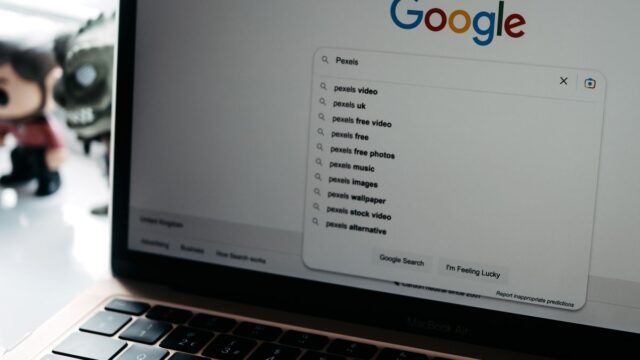
A long tail keyword is a specific, low-volume search phrase — and for small sites, it is often the easiest way to win search traffic.
A backlink is a link from another website to yours. Search engines treat it as a vote of confidence — and it still drives rankings.