
What Is an SSL Certificate? A Simple Guide for Small Business Owners (2026)
 By Taylor Orlando
·November 15, 2026

An SSL certificate is a small digital file that sits on your web server and does two jobs: it proves your website is really yours, and it scrambles the data that travels between your site and your visitors so no one else can read it. When a site has one, its address starts with https:// and browsers show a small padlock next to it. When it does not, browsers warn visitors that the site is “Not Secure.”
If you run a small business website, you need one — even if you never sell anything online. This guide explains what an SSL certificate is, how it works, what it costs, and how to get one, in plain English. No technical background needed.
Last updated: November 2026
What Is an SSL Certificate?
Think of an SSL certificate as your website’s ID card. Just as a driver’s license proves who you are, an SSL certificate proves that your website is really the website it claims to be — and it gives your site a secret code it can use to talk safely with visitors.
Here is the short version: when someone visits your site, the certificate lets their browser check two things before any real data moves. First, is this site really yoursite.com, and not a fake copy? Second, can we set up a private, scrambled connection so passwords, emails, and card details stay hidden from anyone listening in?
SSL stands for Secure Sockets Layer. That is the old name of the technology. The system actually used today is called TLS (Transport Layer Security), which replaced SSL years ago. But the name “SSL certificate” stuck, and that is what everyone still calls the product — including the companies that sell them. When you see “SSL” and “TLS” used as if they mean the same thing, that is why.
Every certificate contains a few key facts:
- The domain name it covers, like yoursite.com
- Who owns it — for business certificates, the company name
- Who issued it — the certificate authority, or CA
- The dates it is valid from and to
- A public key, which browsers use to start the private connection
That public key is half of a matched pair. The other half, the private key, stays secret on your server. The two keys work together, and that pairing is what makes the whole system work.
How Does an SSL Certificate Work?
You do not need to understand the math to use SSL. But a simple picture of what happens helps you see why it matters. When a visitor opens your site, this happens in less than a second:
- The browser asks for the certificate. The visitor’s browser contacts your server and asks to see its SSL certificate.
- The server shows it. Your server sends a copy of the certificate, including its public key.
- The browser checks it. The browser checks that the certificate is real, that it matches your domain name, that it has not expired, and that it was issued by a trusted certificate authority.
- A private connection is set up. If the checks pass, the browser and the server agree on a secret code for this visit. From here on, everything they send each other is scrambled.
- The page loads over HTTPS. The padlock appears in the address bar, and the visitor can browse, fill in forms, and pay safely.
The scrambling is the important part. Without it, data travels across the internet in plain text. Anyone on the same public Wi-Fi network, for example, could read it. With SSL, the data is turned into code that only the visitor’s browser and your server can unscramble. Even if someone grabs the data in transit, it looks like gibberish to them.
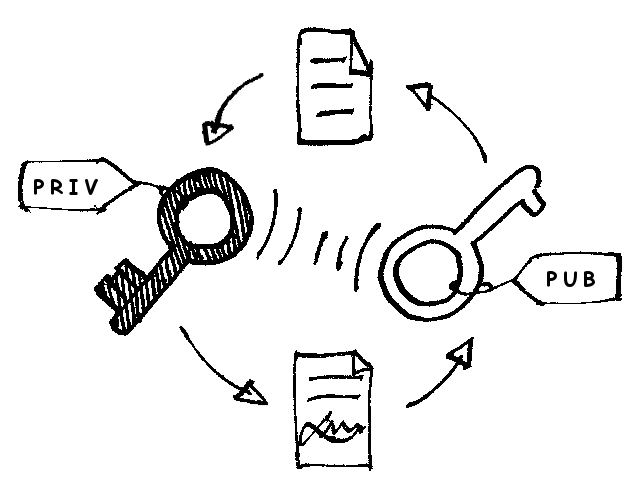
There is one more piece worth knowing: the “handshake.” That is the name for steps 1 to 4 above. Modern versions of TLS (TLS 1.3, the current standard) finish the handshake in one round trip, so it adds almost no delay. Old claims that SSL slows your site down are out of date — on a modern setup, the speed difference is too small to notice.
SSL vs TLS: What Is the Difference?
This confuses a lot of people, so here it is in one paragraph. SSL was the original system, built in the 1990s. Its last version, SSL 3.0, came out in 1996 and is now retired because it has known security holes. TLS is the newer, safer replacement — TLS 1.2 arrived in 2008 and TLS 1.3 in 2018. Every “SSL certificate” sold today actually uses TLS. The name stayed because everyone already knew it. So when a host or a shop sells you an “SSL certificate,” you are really buying a TLS certificate. Same product, old name.
Types of SSL Certificates
Certificates come in two groups: how much checking the issuer does, and how many domains the certificate covers. The two groups combine, so you can have, for example, a DV wildcard certificate.
By validation level: DV, OV, and EV
Domain Validation (DV) is the basic level. The issuer only checks that you control the domain — usually by email or by adding a small file to your site. It takes minutes, and it is free from Let’s Encrypt or a few dollars a year from a paid provider. For most small business sites, blogs, and portfolios, DV is enough.
Organization Validation (OV) adds a business check. The issuer confirms that your company is real and registered before issuing the certificate. It takes one to three days and costs more. Visitors can see your company name in the certificate details. OV suits registered businesses that want a bit more trust, especially if they collect customer data.
Extended Validation (EV) is the strictest level. The issuer checks your business identity, legal status, and physical address in detail. It can take several days and costs the most. EV is for banks, large online stores, and health or finance sites where trust is everything.
| Type | What is checked | How long it takes | Best for |
|---|---|---|---|
| DV | You control the domain | Minutes | Blogs, small business sites, portfolios |
| OV | Domain + your business is real | 1–3 days | Registered businesses, sites that collect data |
| EV | Domain + full business identity check | Several days | Banks, large stores, finance and health sites |
By domain coverage: single, wildcard, and multi-domain
A single-domain certificate covers one domain, like yoursite.com, and usually its www version too. A wildcard certificate covers one domain and all its subdomains — blog.yoursite.com, shop.yoursite.com, app.yoursite.com, and any future ones. A multi-domain certificate (also called SAN or UCC) covers several different domain names on one certificate, which suits agencies or businesses that run more than one site.
For a typical small business, a single-domain DV certificate is the right start. If you later add a shop or a blog on a subdomain, switch to a wildcard.
How Much Does an SSL Certificate Cost?
This is the question most guides skip, so here are real 2026 price ranges in US dollars. Prices change between sellers, so treat these as bands, not exact quotes.
| Certificate type | Price per year | Best for |
|---|---|---|
| Free DV (Let’s Encrypt or your host) | $0 | Blogs, portfolios, small business sites |
| Paid DV, one domain | $8–$140 | Sites that want support, a warranty, or a site seal |
| OV, one domain | $30–$200 | Registered businesses and nonprofits |
| EV, one domain | $75–$400+ | Large stores, banks, enterprises |
| Wildcard DV | $45–$200 | Sites with many subdomains |
| Multi-domain | $30–$200+ | Agencies, businesses with several sites |
For most small businesses, the practical range is $0 to $50 a year. Many web hosts now include a free SSL certificate with every hosting plan, so check your hosting dashboard before you buy anything.
Free vs paid: which should you pick?
A free certificate from Let’s Encrypt encrypts your site just as well as a paid one. The lock in the browser works the same way. So when should you pay?
Pick free if you run a blog, a portfolio, or a small business site and your host handles the setup and renewal for you. Free is the right choice for most readers of this guide.
Pay if you need OV or EV validation (your business name in the certificate), a wildcard or multi-domain certificate, a warranty (paid certificates come with a money-back promise if the encryption fails), or phone support when something breaks. Paid certificates also last longer per issue — free Let’s Encrypt certificates last 90 days and renew automatically, while paid ones now last up to 200 days per issue.
How to Get an SSL Certificate
There are three paths, easiest first.
1. Through your web host (easiest). Log in to your hosting account and look for “SSL,” “Security,” or “Let’s Encrypt” in the dashboard. Most modern hosts — including the big shared hosts and managed WordPress hosts — offer one-click SSL. Turn it on, and the host installs the certificate and renews it for you. If you use WordPress, Shopify, Wix, or Squarespace, SSL is usually already included and switched on. Check your site’s address: if it starts with https://, you already have one.
2. Free from Let’s Encrypt. If your host does not include SSL, you can get a free DV certificate from Let’s Encrypt. Many hosts support it through cPanel with a tool called AutoSSL, or through a plugin. The certificate renews itself every 90 days, so once it is set up, you can forget about it.
3. Buy from a certificate authority. If you need OV, EV, wildcard, or multi-domain coverage, buy from a CA such as DigiCert, Sectigo, or GlobalSign, or from a reseller. The usual steps are: buy the certificate, generate a CSR (a certificate signing request — a small text file your server creates with your site details), send it to the CA, pass the checks, then install the certificate file your host or server gives you. Your host’s support team can do the install for you if you ask.
After installing, check that your site loads over HTTPS and that old http:// links redirect to the https:// version. Most hosts and WordPress plugins handle this automatically, but it is worth a quick check.
How to Check If a Website Has an SSL Certificate
You can check any site in a few seconds. In Chrome, on a computer:
- Open the site and look at the address bar. A padlock (or a small “tune” icon in newer Chrome versions) means the site has a valid certificate.
- Click the padlock or tune icon, then click “Connection is secure.”
- Click “Certificate is valid” to see the details: who issued it, which domain it covers, and when it expires.
On a phone, tap the padlock or tune icon next to the address in your mobile browser for the same details. You can also use a free online checker: type the domain into a tool like the SSL checker at SSL Labs and it will test the certificate and grade the setup.
What Happens If You Don’t Have an SSL Certificate?
Nothing breaks right away — your site still loads. But the costs add up quietly:
- Visitors see a warning. Chrome and Safari mark http:// pages as “Not Secure” in the address bar. Many visitors leave at that point, especially if your site has a form or a checkout.
- You lose sales and sign-ups. People do not type card details or personal information into a site their browser calls unsafe. Even a contact form feels risky without the padlock.
- Google ranks you lower. Google has used HTTPS as a ranking signal since 2014, and it is also a factor in how your pages show up in search results. An http:// site starts at a disadvantage.
- Some features stop working. Modern browser features such as location, push notifications, and payment tools require HTTPS.
- Payment rules. If you take card payments, the PCI DSS rules that govern card data expect encrypted connections. Without SSL, you may not be able to use a payment provider at all.
In short: an SSL certificate is no longer a nice extra. It is part of having a website at all.
How Long Does an SSL Certificate Last?
Not forever — and the limit keeps getting shorter. Public certificates issued after March 15, 2026 can be valid for at most 200 days, down from 398 days before. The limit is set to drop to 100 days in 2027. Free Let’s Encrypt certificates last 90 days. This is a deliberate change by the browser industry: shorter certificates mean a stolen or mis-issued certificate does less damage.
For you as a site owner, that means renewal matters more than it used to. A simple checklist:
- Use auto-renewal. If your host or Let’s Encrypt renews the certificate for you, leave it switched on. This is the safest option.
- Set a reminder. If you renew by hand, set a calendar reminder 30 days before the expiry date shown in the certificate details.
- Watch for the expiry warning. If a certificate expires, visitors see a full-page “Your connection is not private” error and most will not continue. Renew before that happens, not after.
- Keep contact details current. Renewal reminders go to the email on your hosting or CA account. If that inbox is old, you will miss them.
Common SSL Errors and What They Mean
If you or your visitors ever see an SSL warning, here is what it usually means and what to do. These are written for the site owner, not for a developer.
“Your connection is not private” (NET::ERR_CERT_DATE_INVALID). The certificate has expired, or the visitor’s computer clock is wrong. As an owner, renew the certificate. As a visitor, check your device date and time first — a wrong clock is the most common cause.
Certificate name mismatch. The certificate covers a different domain than the one being visited — for example, it covers yoursite.com but the visitor opened www.yoursite.com and the certificate does not include it. Fix it by getting a certificate that covers both versions, or a wildcard.
Self-signed certificate. The certificate was made by the server itself, not by a trusted authority. Browsers do not trust it. Replace it with a certificate from a trusted CA or your host.
Mixed content. The page loads over HTTPS, but some images, scripts, or styles still load over http://. Browsers may block those parts or show a warning. Fix it by changing the old http:// links in your pages to https://, or use a plugin that does it for you.
“Certificate cannot be trusted” or untrusted issuer. The certificate chain is broken or the issuer is not in the browser’s trusted list. Usually the fix is to install the intermediate certificate your CA provides, or to get a fresh certificate from a trusted CA.
If an error appears right after you install a new certificate, wait a few minutes and check again — some changes take a little while to spread. If it stays, ask your host’s support team; they fix these every day.
What an SSL Certificate Does NOT Do
This is the part most sellers skip, and it matters. A padlock means the connection is private. It does not mean the site is honest, safe, or well built.
- It does not stop phishing. A fake site can get a free DV certificate in minutes. The padlock only proves the connection is encrypted, not that the business behind the site is real.
- It does not remove malware. SSL protects data in transit. It does nothing about a hacked site, a virus, or bad code on the server.
- It does not protect your website itself. You still need updates, strong passwords, backups, and a firewall. SSL is one layer, not the whole security plan.
- It does not mean the content is true. Anyone can publish anything over HTTPS. Check the site itself, not just the padlock.
So treat the padlock as a starting point, not a verdict. A site without one is a warning sign. A site with one still needs a second look before you trust it with money or personal details.
Do You Really Need an SSL Certificate?
Yes — for any website, even a simple blog or portfolio. Browsers label non-HTTPS sites “Not Secure,” Google ranks HTTPS pages better, and visitors trust the padlock. And for most small sites, the certificate is free through your host or Let’s Encrypt, so there is no reason to run without one.
If your site already has one, check the expiry date and make sure auto-renewal is on. If it does not, start with your hosting dashboard — the fix usually takes less than ten minutes and costs nothing.
Frequently Asked Questions
What does SSL stand for?
SSL stands for Secure Sockets Layer. It is the old name for the technology that encrypts data between a browser and a website. The current version is called TLS (Transport Layer Security), but the name SSL stuck.
Can I get an SSL certificate for free?
Yes. Let’s Encrypt gives free DV certificates, and most web hosts include a free certificate with their hosting plans. A free certificate encrypts your site just as well as a paid one. You pay only when you need OV or EV validation, wildcard or multi-domain coverage, a warranty, or extra support.
How much does an SSL certificate cost?
From $0 for a free Let’s Encrypt certificate to over $400 a year for a premium EV certificate. For most small businesses, the real range is $0 to $50 a year: free DV, or a paid DV certificate at $8–$140 a year. OV certificates run $30–$200 a year, EV $75–$400 or more, and wildcard certificates $45–$200 a year.
How do I get an SSL certificate?
The easiest way is through your web host — most hosts offer one-click SSL in their dashboard and renew it for you. You can also get a free certificate from Let’s Encrypt, or buy one from a certificate authority such as DigiCert or Sectigo if you need OV, EV, or wildcard coverage.
What happens if my SSL certificate expires?
Visitors see a full-page “Your connection is not private” warning, and most will leave. Search engines may also drop or flag the site. Renew before the expiry date — ideally with auto-renewal switched on, so it never lapses.
Why is SSL no longer used?
SSL itself is retired because its old versions have known security holes. It was replaced by TLS, which is safer and faster. The product is still called an “SSL certificate” by habit, but every certificate issued today actually uses TLS.
How do I fix an SSL certificate error?
It depends on the error. If you are a visitor, first check your device’s date and time — a wrong clock is the most common cause — then clear your browser data and try again. If you own the site, check whether the certificate has expired, whether it covers the right domain, and whether any page content still loads over http://. If the error stays, ask your host’s support team.
Does an SSL certificate help SEO?
Yes, a little. Google has used HTTPS as a ranking signal since 2014. It will not push a weak page to the top on its own, but an http:// site starts at a disadvantage, and visitors who bounce from a “Not Secure” warning send a bad signal too.

Taylor Orlando
Taylor Orlando is a content writer at Meregate covering websites, SEO, and AI. Taylor breaks down complex topics into simple, practical guides that help small businesses build better websites, rank higher on Google, and get real value from AI tools — no jargon, no fluff.