
Computers
How to Create a Website for Free: A Simple Step-by-Step Guide (2026)
You can build a real website for $0 — no coding needed. This guide walks you through each step, compares the best free builders, and shows the limits to watch out for.

 By Taylor Orlando
·November 21, 2026
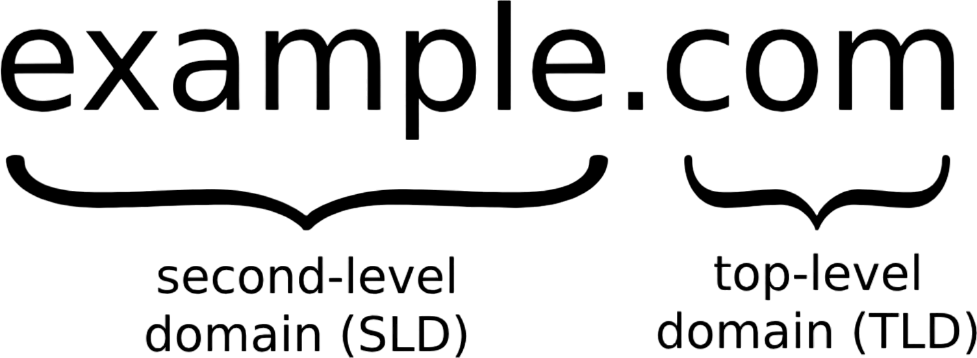
Buying a domain name is one of the first steps in starting a website. It sounds technical, but the whole thing takes about ten minutes. You pick a name, check that nobody else is using it, pay a small yearly fee, and the name is yours to use. This guide walks you through how to buy a domain name step by step, what it really costs, and the mistakes that catch first-time buyers out.
Last updated: November 2026
Here is the one thing most beginners get wrong: you do not own a domain name. When you “buy” a domain, you are really renting the right to use it for a set period, usually one to ten years at a time. As long as you keep renewing it, it stays yours. If you stop renewing, it goes back on sale and anyone can register it.
Three groups are involved in every domain name:
There were 411.6 million registered domain names in the world at the end of September 2026, and 169.8 million of them were .com names, according to Verisign’s Domain Name Industry Brief. So the name you want may already be taken — but there is almost always a good backup.
A good domain name is short, easy to say out loud, and easy to spell after hearing it once. If you have to spell it out letter by letter every time, it is too hard. Keep these rules in mind:
Have two or three backup names ready before you start. Your first choice may be taken, and backups save you from picking a bad name in a rush.
Go to any registrar’s website and type your name into the search box. You will get an instant answer: available, or taken. The search also shows other endings for the same name, so you can see at a glance whether yourname.net or yourname.co is free when .com is gone.
If your first choice is taken, you have four honest options:
Before you pay for a name someone else used before, check its history. ICANN’s lookup tool shows who a domain is registered to and when it was first registered. A name with a spammy past can cause trouble with email and search, so a quick check is worth the minute it takes.
You can buy a domain in three places, and the right one depends on what you already have:
| Where you buy | Best for | Watch out for |
|---|---|---|
| Domain registrar (Namecheap, Porkbun, Cloudflare, Dynadot) | Most buyers. Best prices, full control, easy to move later. | Some push add-ons at checkout. |
| Web host (Bluehost, Hostinger) | You need hosting too and want one bill and one account. | Renewal prices are often higher than a registrar’s. |
| Website builder (Wix, Squarespace, Shopify) | You are building your site on that platform anyway. | Moving the domain away later takes a few extra steps. |
For most people, a registrar is the simplest choice. You keep full control of the name, and you can point it at any host or builder later. Buying from your host is fine too, as long as you check the renewal price first — that is where the real cost hides.
This is the step that saves you real money. Many companies sell the first year cheap — sometimes for a dollar — then charge a much higher price every year after. The renewal price is the price you will pay for the life of the domain, so it is the only number that matters.
For a .com, the wholesale price every registrar pays went up from $10.26 to $10.97 a year on November 1, 2026, plus a $0.20 ICANN fee. That means $11.17 is the lowest any registrar can charge without losing money. Here is what a .com actually costs to keep at some well-known companies, at list prices in November 2026:
| Registrar | First year | Renewal per year |
|---|---|---|
| Dynadot | $11.62 | $11.62 |
| Porkbun | $11.81 | $11.81 |
| Cloudflare Registrar | $11.17 (at cost) | $11.17 (at cost) |
| Namecheap | $15.98 | $19.98 |
| GoDaddy | Often discounted | $22.99 |
Prices change often, so check the current renewal price on the registrar’s own pricing page before you buy. A .com usually costs between about $12 and $23 a year to keep. Other endings vary a lot: .org and .net are in the same range, while some newer endings can cost $30 or more a year to renew, even if the first year is nearly free.
Two more cost facts worth knowing:
When you check out, the registrar asks for the registrant’s details: name, address, and email. This is the legal owner of the domain. Use your own name or your business’s name — never your web designer’s name, and never an employee’s personal email.
Why it matters: if a dispute ever comes up, or you need to prove the domain is yours, the registrant details are what count. A domain registered in someone else’s name is, for practical purposes, theirs. If someone sets up a website for you, ask them to register the domain in your name and give you the login.
Use an email address you actually read and will keep for years. The registrar sends renewal reminders, security alerts, and the verification email to that address. A work email you might lose access to is a bad choice.
When you register a domain, your name, address, email, and phone number go into a public database called WHOIS. Anyone can look it up. That is how spam calls and junk mail start.
Privacy protection (also called WHOIS privacy or ID protection) replaces your details with the registrar’s details in the public record. It is free at most good registrars today, including Namecheap, Porkbun, and Cloudflare. Some companies still charge a few dollars a year for it — if yours does, that is a sign to buy elsewhere. Keep the free privacy protection turned on.
Checkout pages are full of add-ons, and most of them are not worth your money on day one:
Keep what is free (privacy protection), skip the rest, and pay. The whole checkout should take two or three minutes.
After you buy, the registrar sends a verification email to the address you gave. You must click the link in it within 15 days. This is an ICANN rule, not a suggestion — if you miss it, the registrar can suspend the domain until you verify.
The email usually arrives within minutes. If you do not see it, check your spam folder, then ask the registrar to resend it from your account dashboard. Do not skip this step: an unverified domain can go offline without warning.
Buying the domain is only half the job. A domain on its own is just an address — it does not hold a website or an email inbox. Here is what comes next:
The domain is registered as soon as your payment goes through. It usually starts working within a few minutes to a few hours once you point it at your hosting.
A .com usually costs about $12 to $23 a year to keep, depending on the registrar. The wholesale price is $10.97 a year plus a $0.20 ICANN fee, so anything close to $11 to $12 a year is a fair price. Watch the renewal price, not the first-year deal. Other endings can cost more or less.
No. You are renting the right to use it for the period you paid for, up to 10 years at a time. You keep control by renewing before it expires. In ICANN’s own words, buying a domain is “more like leasing the domain name from the registry operator.”
Try a small change to the name, another ending like .net or .co, or make an offer to the current owner through the registrar or a domain marketplace. You can also set a backorder, which tries to register the name if the owner lets it expire — but it is not guaranteed.
About ten minutes. The domain is registered the moment your payment goes through, and it usually starts working within a few hours once you point it at your hosting.
Yes. A domain and hosting are two separate things. You can buy the name now and connect it to a website later. Many people buy a domain first to make sure nobody else takes it, then build the site when they are ready.
Yes. Unlock the domain at your current registrar, get the transfer authorization code, and start a transfer at the new registrar. Transfers usually take a few days, and the domain stays live during the move. You cannot transfer a domain within 60 days of registering it or transferring it — that is an ICANN rule.
Sometimes. Web hosts and website builders often include a free domain for the first year. That is fine, but check what it renews at. A “free” domain that renews at $25 a year costs more than buying from a registrar that charges $12 a year. Also make sure the domain is registered in your name, not the company’s.

Taylor Orlando is a content writer at Meregate covering websites, SEO, and AI. Taylor breaks down complex topics into simple, practical guides that help small businesses build better websites, rank higher on Google, and get real value from AI tools — no jargon, no fluff.
You can build a real website for $0 — no coding needed. This guide walks you through each step, compares the best free builders, and shows the limits to watch out for.

Website hosting costs $2–$10 a month for most small sites in 2026. Compare prices by hosting type, see full first-year totals, and learn how to avoid the renewal price jump.

A blank white page on your WordPress site usually means a PHP error stopped the page from loading. These 9 steps will help you find the cause and fix it.