
Artificial Intelligence
Best AI Video Generator for YouTube (2026): 10 Picks
No single tool wins for every YouTube channel. Compare 10 AI video generators by the job — long-form, Shorts, faceless videos or repurposing — with prices.

 By Taylor Orlando
·November 18, 2026
Last updated: November 2026
The question how do ai chatbots work comes up a lot, and the short answer is simple. A chatbot reads your message, works out what you want, and then writes or finds a reply. It does all of this in under a second. If you want the plain definition first, our guide to what an AI chatbot is covers it. This guide shows the full process, step by step, in plain words.
When you type a message to a chatbot, three things happen. First, the bot reads your words and works out what you mean. Second, it picks or writes a reply. Third, it sends that reply back to you. A simple bot follows fixed rules to do this. A modern AI chatbot does it with a large language model, a type of software trained on huge amounts of text.
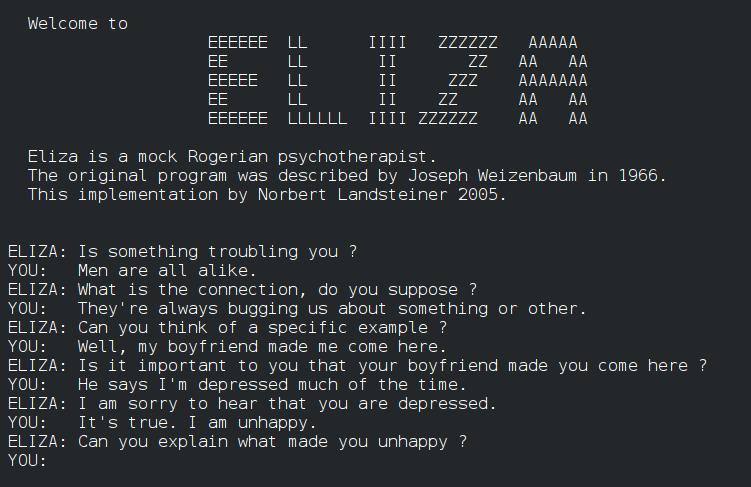
Chatbots are not new. ELIZA, built in 1966, was one of the first programs to simulate conversation by matching patterns in what people typed. It did not understand language the way a person does. Modern chatbots work in a very different way, but the basic job is the same.
Every message you send to an AI chatbot goes through the same five steps. Let us follow one example through all five. You type: “Do you deliver to Chicago?”
You type your question and press send. The app sends your text to the chatbot system. It may also send a little context, such as the page you are on or the last few messages in the chat.
The bot reads your message and asks one main question: what does this person want? Here, you want to know if delivery covers Chicago. The bot reads the full sentence, not just the word “Chicago”. It works out the intent, a delivery-area question, and picks out the key detail, the place name Chicago.
Once the bot knows the intent, it needs a reply. A rule-based bot looks up a fixed answer written in advance. An AI bot writes a fresh reply, word by word. Here, the right reply needs a fact: does this shop deliver to Chicago or not? A good business bot checks that fact in its own records first.
The bot sends the reply to your screen. It may look instant, but the bot wrote it one word at a time, very fast. Modern LLM chatbots generate replies in real time, so each answer is written fresh for your message. For our example, the reply could be: “Yes, we deliver to Chicago. Delivery takes 2 to 3 working days and costs $6.50.”
A rule-based bot does not learn from your chat. It runs the same rules every time. An AI bot can improve over time: the team behind it can study chats, find weak answers, and then fine-tune the model or fix the documents it reads from. Your single chat does not retrain the model on the spot.
A rule-based chatbot works like a decision tree. If you type A, it answers B. If you type C, it answers D. The paths are set in advance by a person. This type of bot is cheap to build and easy to control. It works well for a small set of common questions, such as opening hours or order tracking. It fails when you ask something in a new way, or ask a question nobody wrote a rule for.
An AI chatbot uses a model that reads meaning, not just exact words. Try two versions of our Chicago question: “Do you deliver to Chicago?” and “I live in Chicago. Can I get my order sent to me?” An AI bot should give two reasonable answers, even though the words are different. A rule-based bot would likely give the same canned line for the first question, and a fallback such as “I did not understand that” for the second.
If the bot gives the exact same sentence every time, it is probably rule-based. If the wording changes a little each time, but the facts stay the same, it is probably an AI bot. Rule-based bots are steady but stiff. AI bots are flexible but can make mistakes.
NLP stands for natural language processing. It is the set of steps a chatbot uses to turn your raw text into something it can work with. You do not need to know the math. You only need the four parts below.
First, the bot breaks your message into small pieces called tokens. A token can be a whole word, part of a word, or a punctuation mark. For English, one token is roughly 3 to 4 characters. Anthropic, the company behind Claude, puts it at about 3.5 characters per token on earlier Claude models. You can read more in Anthropic’s guide to token counting.
Next, the bot works out your intent, the goal behind your words. “Do you deliver to Chicago?” has a delivery-area intent. “I want to cancel my order” has a cancel-order intent. The bot has learned these patterns from many examples. It compares your message with what it has seen before and picks the most likely intent.
At the same time, the bot pulls out the key details, called entities. These are names, dates, places, order numbers, and product names. In “Do you deliver to Chicago?”, the entity is Chicago, a place. In “Cancel order 4821”, the entity is the order number 4821. Entities tell the bot which facts it needs to check.
Last, many bots check sentiment, the tone of your message. “This is great, thanks” is positive. “This is the third time I have asked” is upset. A bot can use that tone to change how it replies. IBM has a clear, plain guide to how chatbots use natural language understanding.
LLM stands for large language model. ChatGPT, Claude, and Gemini are all examples. An LLM is the engine inside most modern AI chatbots. It writes replies by predicting the next word, over and over, until the reply is done.
During training, the model reads huge amounts of text: books, web pages, and articles. It learns which words tend to follow which other words. It learns grammar, facts, styles, and common patterns. When you ask a question, it uses that learning to guess the most likely next word, then the next, then the next. It does this very fast, and the result reads like normal writing.
After the first round of training, the model is fine-tuned with human feedback. People read its replies and mark the good and weak ones, and the model is tuned to give more replies like the good ones. This step is called reinforcement learning from human feedback, or RLHF for short. Keep one fact in mind: an LLM predicts likely text, not truth.
RAG stands for retrieval-augmented generation. The name is long, but the idea is simple. Before the bot writes its reply, it looks up facts in documents the business gave it, such as a price list, a delivery policy, or a help guide. Then it uses those facts to write the answer.
Without RAG, the bot answers from what it learned during training. That learning is broad, but it is old, and it knows nothing about your shop. With RAG, the bot first checks your own papers, then answers from those papers. For our Chicago question, it would check the delivery policy and write a reply based on that fact.
This is how most good business bots work today. The model does the writing. Your documents do the fact-checking. A bot that can check a price list is far less likely to invent a price than a bot that has to guess.

A chatbot has two kinds of memory. The first is working memory, also called the context window. This is the amount of text the bot can hold in mind at one time during a chat. It includes your last few messages and the bot’s replies. The size is measured in tokens. When the chat grows past the window, the oldest messages drop out of mind. That is why a bot can forget what you said at the start of a very long chat.
The second is long-term memory, what the app saves about you between chats. Most chatbots do not have this by default. When you close the chat and come back tomorrow, the bot does not remember you unless the app saved that data on purpose.
Sometimes a chatbot gives an answer that sounds sure but is wrong. It may invent a price, a date, a link, or a fact. This is a known problem, and it has a name. The US National Institute of Standards and Technology calls made-up chatbot output “confabulation”. Most people call it hallucination. You can read the background in NIST’s AI Risk Management Framework.
Why does it happen? An LLM predicts likely text, not truth. When it does not know a fact, it can still write a sentence that looks right. It fills the gap with the most likely words, and those words can be wrong. It uses the same calm tone for true facts and wrong ones, so it is hard to spot by style alone.
What can you do about it? Check important facts on the official site or with a person. Ask the bot to show its source when it can. If you run a business bot, ground it in your own documents and keep them up to date. Made-up answers do not mean the bot is lying. Treat its words as a draft, not as a source of truth.
First, a chatbot does not really understand. It can read patterns in words and write text that fits those patterns, but it does not know what the words mean in the way a person does. It has no real-life experience. It works with text, not with the world behind the text.
Second, a chatbot cannot make good judgement calls on its own. It can list the pros and cons of a choice, but it cannot weigh them the way a person can. Use it to gather facts and ideas, then make the call yourself.
Third, a chatbot cannot keep secrets. Do not share passwords, bank details, or private health facts with a chatbot unless you are sure the app is safe and the data is needed. Chats may be stored or used to improve the system. If you would not type it into a public form, do not type it into a chatbot.
A chatbot reads your message, works out what you want, and then writes or finds a reply. An AI chatbot does this with a large language model, which predicts the next word, one word at a time, based on huge amounts of text it learned from.
Not in the way a person understands. A chatbot reads patterns in your words and works out the most likely intent, but it does not have real-life experience or true knowledge of meaning. It can miss jokes, sarcasm, or very unclear messages.
Because it predicts likely text, not truth. If it does not know a fact, it may write a sentence that sounds right but is wrong. This is called confabulation or hallucination. The best fix is to ground the bot in real documents, through RAG, and to check key facts on the official source.
Usually, no. Inside one chat, it holds the recent messages in its context window, its working memory. When you close the chat, that working memory is gone, unless the app saved notes about you on purpose.
It depends on the job. AI chatbots suit open chat, because they handle many ways of asking the same thing. Rule-based chatbots suit a small set of fixed questions with exact answers, such as prices or opening hours. Many good business bots use both.

Taylor Orlando is a content writer at Meregate covering websites, SEO, and AI. Taylor breaks down complex topics into simple, practical guides that help small businesses build better websites, rank higher on Google, and get real value from AI tools — no jargon, no fluff.
No single tool wins for every YouTube channel. Compare 10 AI video generators by the job — long-form, Shorts, faceless videos or repurposing — with prices.
An AI chatbot is software that holds a conversation with a person in natural language. This plain-words guide explains how it works, the main types, and where small businesses use them.

Compare 8 beginner-friendly AI video generators, from Canva and CapCut to Runway and Synthesia, with free plans, prices, and honest limits to help you pick the right one.