
SEO
How Long Should a Blog Post Be for SEO? The Honest Answer (2026)
There is no magic word count that guarantees rankings. Here is what the data actually says, and how to pick the right length for your post.

 By Taylor Orlando
·November 5, 2026

More people now get answers from AI instead of clicking through ten blue links. Google’s AI Mode passed one billion monthly users in May 2026, and AI Overviews now appear on close to half of all Google searches. ChatGPT, Perplexity and Claude answer questions the same way: they read web pages, then write one answer with links to the pages they used.
Website optimization for AI search means making your site easy for these systems to find, understand and cite. It is often called GEO, short for generative engine optimization. The good news: Google says it plainly — optimizing for AI search is still SEO. The same basics matter. What changes is the goal. You are no longer trying only to rank in a list. You are trying to be the page the AI quotes.
This guide walks through the steps that matter, in plain order, with nothing to buy. Every step below is free.
AI search optimization is the work of making your website visible inside AI-written answers. When someone asks Google AI Mode or ChatGPT a question, the system searches the web, picks a few pages, and writes an answer based on them. If your page is one of the sources, you get a link and, often, a visit. If it is not, you are invisible for that question — even if you rank well in normal results.
It is different from classic SEO in one big way. In classic search, position four still gets clicks. In AI search, there is no position four. Either the AI cites you, or it does not. That sounds harsh, but it also means small sites have a real chance. AI answers pull from a wider mix of pages than the top ten results do, and a clear, well-written page from a small business can beat a big brand’s thin page.
You do not need new tools or a new budget for this. Most of the work is writing clear pages and keeping your site’s basics in order.
Google explains its method in simple terms. When you ask AI Mode a question, it splits the question into smaller parts and searches for each part at the same time. Google calls this query fan-out. For a question like “how to fix a lawn full of weeds”, it might search for the best weed killers and for ways to remove weeds without chemicals, then combine what it finds into one answer.
Two things follow from this:
Google also says its AI features are rooted in its core search ranking and quality systems. That is why the same advice keeps coming back: publish helpful, original pages, and make them easy to read. Google’s own guide to optimizing for generative AI features puts it simply — from Google’s view, optimizing for AI search is still SEO.
The engines also work differently from each other. Perplexity cites sources often and links heavily. ChatGPT is more selective and leans on fresh pages from trusted sites. Gemini pulls from Google’s index and prefers well-known sources. That is why only 7.7% of cited URLs show up in more than one engine, according to one study — you cannot win AI search by pleasing a single system. Clear, factual pages are the common ground.
Nothing else matters if your pages are not in Google’s index. Google’s guide lists two conditions for appearing in its AI features: the page must be indexed and eligible to show a snippet, and the site must be included in Search generative AI features in Search Console. Inclusion is the default setting, so most sites already pass the second test. It only matters if someone changed it.
Check the basics:
AI search is built on questions. People type full questions now, not two-word keywords: “how much does it cost to replace a roof”, “is WordPress good for a small shop”. Your pages should answer those questions the way a helpful person would.
A simple format works well:
Write for the person reading, not for the machine. Short sentences. Plain words. No jargon unless you explain it right away.
AI answers are built from short passages. The easier a passage is to lift out and use, the more likely it is to be used. That gives you a clear checklist:
Do not copy AI-written text and paste it on your site. Pages that add nothing new will not get cited, and they will not rank either.
Structured data is a small block of code that tells search engines what a page is about — a recipe, a product, a FAQ, a local business. It helps machines read your page with less guessing.
Be honest about what it does: Google says structured data is not required for its AI features, and there is no special markup you need to add to appear in AI Overviews or AI Mode. It is still worth adding where it fits, because it powers rich results in normal search and makes your page easier to understand.
Start with these three:
WordPress users can add these with Rank Math or a similar SEO plugin. After you add it, test the page with Google’s Rich Results Test and fix any errors it shows.
If your plugin does not add FAQ markup for you, here is a small example you can paste into a code block. Change the question and answer to match your page:
{
  "@context": "https://schema.org",
  "@type": "FAQPage",
  "mainEntity": [{
    "@type": "Question",
    "name": "How much does a small business website cost?",
    "acceptedAnswer": {
      "@type": "Answer",
      "text": "A simple small business website usually costs $500 to $5,000 to build, plus $10 to $30 a month for hosting and a domain name."
    }
  }]
}AI answers trust pages that other sites mention. When blogs, news sites, directories and forums link to you or name your business, it signals that real people find you useful.
You cannot buy this honestly, and you should not try. Google’s guide warns against seeking inauthentic mentions — paid links and fake reviews will hurt you, not help. What works for a small business, in order:
This is slow work. It is also the work that separates sites AI systems trust from sites they ignore.
You may have seen people selling llms.txt as the secret to AI search. Here is what is actually true.
llms.txt is a small text file you can place at the root of your site. It lists your most important pages in a format made for AI systems. It was proposed in September 2024 by Jeremy Howard, and a second version arrived in August 2026. You can read the proposal at llmstxt.org.
The honest part: Google says it ignores the file. Its guide states that creating llms.txt “will neither harm nor help your site’s visibility or rankings in Google Search”. A study of nearly 300,000 domains in October 2026 found about 10% of sites had one, and no link between having the file and being cited more often by AI systems.
So should you add one? It costs nothing and takes a few minutes, and some tools for developers do read it. But do not pay anyone for it, and do not expect it to change your rankings. The work in steps 1 to 5 matters far more.
AI systems can only cite pages their crawlers can fetch. If your robots.txt blocks them, you are invisible to AI answers even if you rank on Google.
The crawlers to know:
Check your robots.txt file at yoursite.com/robots.txt. If you see “Disallow” lines for these bots, you made a choice — maybe a fair one, since letting them in means your content trains and feeds AI answers. But know the trade: blocking them means no citations from those systems. Most small businesses want to be found, so they leave the bots allowed. A robots.txt that lets the main AI crawlers in looks like this:
User-agent: GPTBot
Allow: /

User-agent: OAI-SearchBot
Allow: /

User-agent: ClaudeBot
Allow: /

User-agent: PerplexityBot
Allow: /

User-agent: CCBot
Allow: /
The file is yours to control, and you can change it any time.
You cannot improve what you cannot see. AI search is still hard to measure, but there are three checks that work today:
A free tracking routine that takes about 30 minutes a month: write down ten questions your customers actually ask, in a simple spreadsheet. Each month, ask each question in Google AI Mode, ChatGPT and Perplexity, and mark whether your site is cited, mentioned without a link, or missing. Over three months you will see which pages are gaining ground and which questions need a better page. For a small site, being cited for two or three of the ten after a few months is a good start.
Do not pay for a tool that promises exact AI-search rankings. The numbers in this space are estimates, and the official data is thin. Your own manual checks are more honest than a paid dashboard right now.

Week 1: Check the basics. Confirm your key pages are indexed in Search Console. Make sure the site is included in Search generative AI features. Check robots.txt.
Week 2: Fix your top five pages. Rewrite the first paragraph of each so it answers the main question directly in 40 to 60 words.
Week 3: Add a FAQ section to each page, with real questions customers ask. Add FAQ structured data with your SEO plugin.
Week 4: Test it yourself. Ask AI Mode, ChatGPT and Perplexity your top ten customer questions. Write down where you appear and where you do not. Use that list to plan your next articles.

Most commonly GEO, short for generative engine optimization. You will also see AEO (answer engine optimization), LLMO, and “AI SEO” or “AI search optimization”. They all mean the same job: making your site visible inside AI-written answers.
It is the work of making your website easy for AI search systems — Google AI Mode, AI Overviews, ChatGPT, Perplexity and Claude — to find, understand and cite in their answers. It is often called GEO, short for generative engine optimization.
Mostly, yes. Google says optimizing for its AI features is still SEO, because those features are built on its core ranking systems. The difference is the goal: instead of only ranking in a list of links, you also want to be cited inside the AI-written answer.
Make sure ChatGPT’s crawlers can read your pages, then publish clear pages that answer real questions with facts, numbers and examples. There is no submission form and no shortcut. Being cited comes from being the clearest source on the question.
No. Google says it ignores the file, and a 2026 study of 300,000 domains found no link between having one and being cited more often. It is free and harmless to add, but it is not required and will not change your rankings.
Plan on weeks to months. AI systems re-read pages on their own schedule, and citations change often — one study found nearly half of cited URLs change between updates. Keep your pages fresh and check monthly.
Not yet. AI Overviews appear on close to half of searches, but people still click through to pages, and normal results still exist below the AI summary. The smart move is to do both: rank well and get cited.
No. AI is changing SEO, not replacing it. Google says its AI features are built on its core ranking systems, so the same foundations — helpful content, clear structure, fast pages, real authority — still decide who gets seen. What changed is the shape of the results: more answers with no click, and citations mattering as much as rankings.
Last updated: November 2026

Taylor Orlando is a content writer at Meregate covering websites, SEO, and AI. Taylor breaks down complex topics into simple, practical guides that help small businesses build better websites, rank higher on Google, and get real value from AI tools — no jargon, no fluff.
There is no magic word count that guarantees rankings. Here is what the data actually says, and how to pick the right length for your post.

Spam Score is a Moz metric that estimates how closely a website resembles sites Google has penalized. Here is what the number means, and what to do about it.
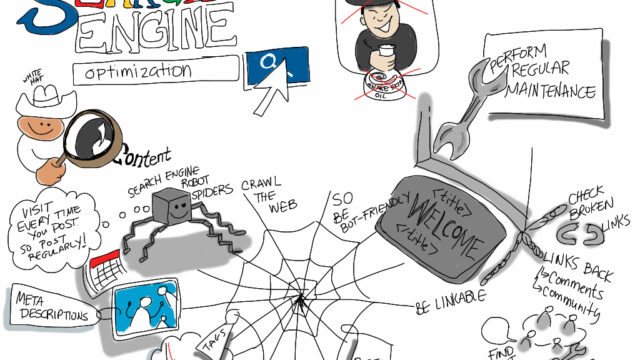
You can do SEO on your own without hiring an agency. Learn the free tools, the steps in order, and a realistic 90-day plan that fits a busy small business owner.