How to Choose a Domain Name: 12 Tips for Small Business (2026)
Learning how to choose a domain name is one of the first real decisions you make when you start a business website. Your domain is the address people type, say out loud, and print on business cards, so it is worth taking an hour to get it right. A good name is short, easy to remember, and hard to confuse with someone else’s. A bad one follows you around for years, as you spell it out on every phone call.
The good news is that you do not need branding experience to pick well. You need a short list of names, a few simple checks, and the patience to walk away from a name that fails a check. This guide walks through all three, with honest costs and the traps that catch first-time buyers.
What a Domain Name Actually Is
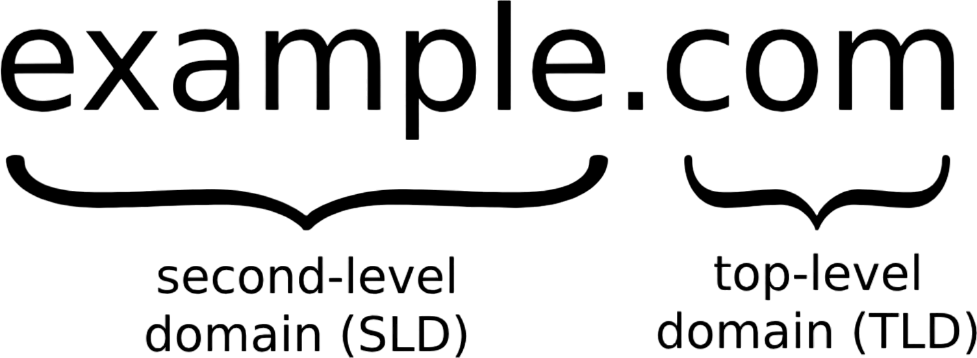
A domain name is the human-readable address of your website, like yourbusiness.com. Behind the scenes, computers use numbered addresses, and the Domain Name System (DNS) translates your name into those numbers so browsers can find your site. You do not need to understand how DNS works to buy a domain, but it helps to know what you are paying for.
Three things people often mix up:
- Domain name: the address itself (yourbusiness.com). You rent it by the year and renew it to keep it.
- Hosting: the rented space where your website’s files live. You need both a domain and hosting, and you can buy them from different companies.
- Website: the actual pages people see once they arrive at your address.
Your domain also gives you professional email. An address like hello@yourbusiness.com looks far more trustworthy to customers than a free webmail address, and most hosting or email providers can set it up once you own the domain.

12 Tips for Choosing a Domain Name
1. Start with your business name
If your business is called Maple Street Bakery, maplestreetbakery.com is the obvious first choice. Customers already know your name, so matching it means they can guess your address without searching. Only move away from your business name when it is taken, too long, or hard to spell.
2. Keep it short
Aim for one or two words, and under about 15 characters before the dot if you can manage it. Short names are easier to remember, easier to type on a phone, and less likely to be mistyped. If your full business name is long, try a clean shortened version rather than a five-word domain.
3. Make it easy to say and spell
Use the phone test: say the name to someone once, then ask them to spell it back. If they hesitate, or ask “was that with a C or a K?”, keep looking. Words with unusual spellings, silent letters, or doubled letters that people guess wrong will cost you visitors who land on the wrong site.
4. Read it with the spaces removed
Domain names have no spaces, so read your candidates as one long word. A name that looks fine as separate words can read very differently joined together — a site meant to help people find therapists, for example, can be misread in an embarrassing way when the words run together. Catch it now, not after you have printed it on a sign.
5. Skip hyphens and numbers
Hyphens and numbers create confusion when spoken aloud. Is it “dash” or “hyphen”? Is that a “2” or the word “two”? Every doubt is a lost visitor. The exception is when the number or hyphen is genuinely part of your brand name, the way it is for a business actually called Studio 24.
6. Pick .com first, but know when another ending is fine
The .com ending is still the default people guess, and it carries the most trust with a general audience. If your .com is taken, .net or .org are solid backups, and a country ending like .us can work well for a local business. Newer endings like .shop, .studio, or .co can suit a brand, but expect to repeat yourself: many people will still type .com out of habit, and some will assume your email address ends in .com too.
7. Think brand, not keywords
Stuffing keywords into a domain — something like best-cheap-plumber-austin.com — looks spammy and is hard to build a brand around. Google has also said it treats new domain endings the same as .com for ranking, and a keyword-heavy name on its own does not guarantee a top spot. A short brand name that people remember beats a long descriptive name that nobody can repeat.
8. Make sure it still fits in five years
Do not box yourself in. A name tied to one product, one town, or one service feels limiting the moment you expand. If you might add services or sell in other areas later, pick a name that can grow with you rather than one you will need to replace.
9. Check trademarks before you fall in love with a name
Before you register anything, run a quick search on the USPTO trademark search to see whether someone already owns the name as a trademark in your field. A name that is free to register can still get you a legal letter if it clashes with an existing brand, and rebranding after launch is far more painful than picking a different name now. Also search the web for the name plus your industry, and check the main social media platforms to see whether the matching handles are free.
10. Check the name’s past
If a domain was owned before, its history matters. A name previously used for spam or scammy content can carry baggage with search engines and spam filters. Look up the domain’s history with a WHOIS lookup and a quick archive search before you buy, and walk away if the past looks messy. A clean, never-used name avoids the problem entirely.
11. Compare the renewal price, not just the first-year price
Many registrars sell the first year cheap and renew at a much higher rate. Before you buy, check what the domain will cost in year two and beyond. Typical yearly costs as of 2026 look like this:
| Ending | Typical yearly cost | Best for |
|---|---|---|
| .com | $10–$20 | Most businesses — the default, most-trusted choice |
| .net / .org | $10–$20 | Good backups when the .com is taken |
| .co | $10–$35 | A short, modern alternative to .com |
| Newer endings (.shop, .studio) | $10–$40+ | Niche branding, if you accept the .com confusion risk |
| Premium names (already owned) | $100s–$1,000s+ | Short, high-demand names bought from their current owner |
Prices vary by registrar and change over time, so treat these as a guide. A “free domain” bundled with hosting usually means you pay the renewal price yourself after the first year, so read that fine print too.
12. Register it in your own name, with auto-renew on
This is the tip people skip and later regret. Register the domain under your own name and your own email address — not your web designer’s, and not an employee’s personal account. Losing access to the account that controls your domain can mean losing your website and your email in one stroke. Turn on auto-renew, keep the payment card on file current, and turn on domain privacy protection if your registrar offers it, so your personal contact details are not published in public records.

What to Do When Your First Choice Is Taken
Most good .com names are taken, so do not panic — work through these options in order:
- Add a word. A verb like “get” or “try,” your city, or your service often opens up a clean name: getmaplestreetbakery.com or maplestreetbakeryaustin.com.
- Try another ending. If the .com is taken by an inactive site, a .net, .co, or country ending may serve you well — just weigh the confusion risk from tip 6.
- Buy it from the owner. Many parked domains are for sale through a marketplace or broker. Use an escrow service so payment and transfer happen together, and never open with your maximum budget.
- Wait, but do not hold your breath. Some registrars offer backordering, which tries to grab a name the moment it expires. It sometimes works, but it is not a plan you should build a launch around.
- Pick a new name. If none of the above gives you a clean, sayable name, a fresh name you fully own beats a compromised version of your first idea.
After You Register: A 5-Minute Checklist
- Turn on auto-renew and confirm the renewal price.
- Turn on domain privacy protection if available.
- Confirm the domain is registered in your name with an email address you control.
- Set up a professional email address on the domain.
- Connect the domain to your hosting, and check that your site loads over HTTPS with no “Not Secure” warning.
Frequently Asked Questions
How much does a domain name cost?
A standard .com usually costs around $10 to $20 a year. Newer endings run roughly $10 to $40 a year, while premium names already owned by someone else can cost hundreds or thousands of dollars. Always check the renewal price, not just the first-year offer.
Can I buy a domain name permanently?
No. You register a domain for a set period, usually one or more years, and renew it to keep it. If you stop renewing, the name eventually becomes available for someone else to register. Auto-renew is the simplest way to avoid losing a name by accident.
Do I need a .com?
Not always, but it is the safest default. People guess .com first, so it is the ending least likely to send visitors to the wrong site. If your audience is local or your brand fits a newer ending well, an alternative can work — just be ready to spell it out more often.
Does a domain name affect SEO?
Only a little. A memorable, brandable name helps because people click, remember, and link to it, and that is what actually moves rankings. A keyword-stuffed domain on its own does not guarantee a top ranking, and Google has said it treats newer endings the same as .com for search.
What if my domain name is taken?
Add a word, try another ending, or buy it from its current owner through a marketplace with escrow protection. If none of those gives you a clean name, pick a fresh one — a name you fully own is better than a confusing compromise.
Can I change my domain name later?
Yes, but it is disruptive. You will need to redirect every old page to its new address, update business listings and printed materials, and keep the old domain renewed for at least a year so existing links and bookmarks keep working. It is far easier to choose carefully now than to rebrand later.
Last updated: October 2026